
Database management · a plain-English guide
Database Management: A Plain-English Guide to Keeping Data in Order
What database management is, why it matters, and how to do it well. No jargon.
Database management is the work of storing, organizing, protecting and looking after the data your business depends on, so the right people can find it, trust it and use it. Good database management keeps data safe, quick to reach and easy to understand.
A database is like a well-run warehouse. Database management is everything that keeps it in order: where things go, who may come in, what happens if something breaks, and how fast people find what they need.
What Is Database Management?
A database is an organized collection of data, such as a customer list, an order history or a product catalog. Database management is the ongoing job of keeping those collections accurate, secure and easy to use.
It covers everyday work, like adding a record or finding an order. It also covers rare but important work, like recovering after a failure.
Small teams may manage data in a spreadsheet. As data grows, most teams move to dedicated databases and tools. For a wider definition, see this overview of databases.
Database management means keeping your data safe, organized and easy to reach.
Why Database Management Matters
Every report, app and decision rests on data. If the data is lost, slow or wrong, everything built on it suffers.
Safe data
Backups and access rules protect you from loss and misuse.
Faster answers
A well-kept database returns results quickly.
Fewer mistakes
Clear structure means fewer duplicates and gaps.
Less downtime
Problems are spotted early, before people notice.
Clear access
The right people see the right data, and no one else.
Room to grow
Your data can grow without slowing everyone down.
The Main Tasks of Database Management
Most database management comes down to six jobs.
Storing and organizing
Decide where data lives and how it is laid out, so it is easy to find and hard to mix up.
Controlling access
Give each person only the access they need. Fewer keys means fewer risks.
Backing up and recovering
Copy your data on a schedule, and practise restoring it. A backup you have never tested is a hope, not a plan.
Keeping it fast
Watch how long common tasks take, and fix what slows people down.
Watching for problems
Check space, speed and errors regularly, so small issues do not become outages.
Making changes safely
Test changes before they go live, and keep a record of what changed.
- Plan
- Store
- Protect
- Watch
↺ and around again
Database management is a loop, not a one-time setup.
Types of Databases
Databases come in a few main families. Each one stores data in a different way, and each suits different work.
Relational
Tables with rows and columns, like a well-organized spreadsheet. Good for orders, customers and invoices.
Document
Flexible records that can hold different details. Good for product pages and user profiles.
Key-value
A label and a value, like a coat check ticket. Good for quick lookups.
Graph
Things and the links between them. Good for networks and recommendations.
Analytical
Built to answer big questions across lots of data. Good for reporting.
Wide-column
Very large tables spread across many machines. Good for huge, fast-growing data.
Which type do you need?
Relational
If your data looks like a spreadsheet with clear columns, such as orders and customers, start with a relational database.
Document
If each record can hold different details, such as product pages, a document database fits well.
Key-value
If you mostly fetch one thing by its label, such as a session, a key-value store is simple and fast.
Graph
If the links between things matter most, such as who knows whom, choose a graph database.
Analytical
If you run large reports over lots of history, an analytical database is built for it.
Pick the type that matches how your data is used, not what is fashionable.
Database vs Database Management System
The database is the data itself. A database management system, often called a DBMS, is the software that stores, protects and serves that data. PostgreSQL, MySQL and MongoDB are well-known examples.
People often use the two terms together. When you hear "manage the database", it usually means looking after both the data and the system that runs it.
What Goes Wrong Without Good Database Management
- No tested backups. When something fails, data is lost for good.
- Too many people with access. Mistakes and leaks become more likely.
- Slow results. Reports take minutes and people stop using them.
- Duplicates and mess. The same customer appears three times.
- Nobody knows what is inside. New people cannot find or trust anything.
- Risky changes. An update breaks a report no one knew depended on it.
Warning signs
- People wait a long time for simple reports.
- Nobody is sure who can see what.
- You have never tried restoring a backup.
- The same question gets different answers.
Database Management Best Practices
0 of 8 done
Good checks are part of this. Our guide to data quality shows simple ways to do it.
Manage and Explore Databases with WhoDB
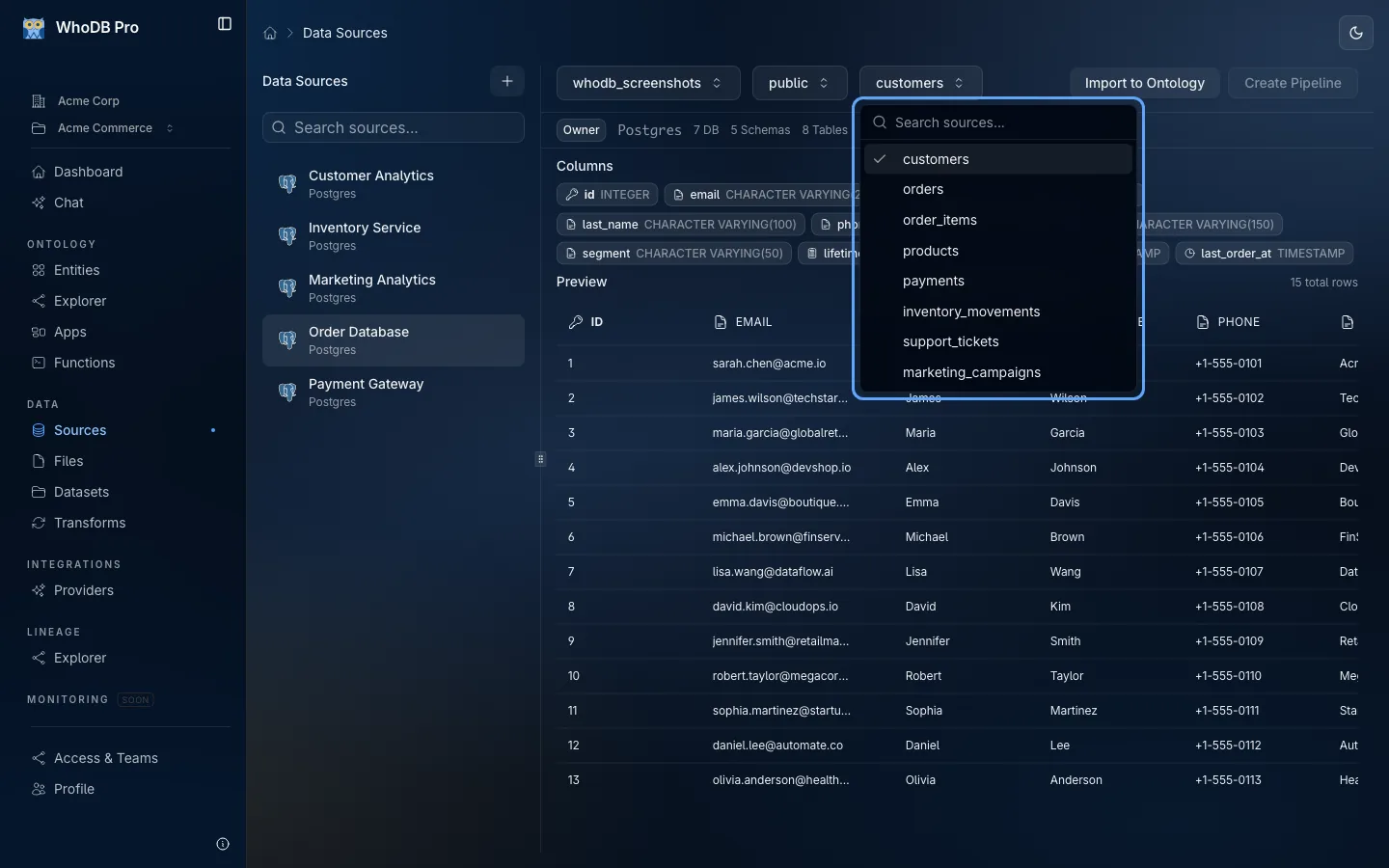
WhoDB is a data platform for lineage, pipelines and AI, built by Clidey. It brings your sources, your queries and your team's context into one visual workspace.
Many sources, one workspace
Bring relational, document, key-value, graph, analytical and cloud data into one project.
Explore and query
Explore schemas, inspect records and run native queries in each source's own language.
Only what each source supports
WhoDB shows the actions a connected source genuinely supports, so people are not guessing.
Find cloud databases
Connect AWS, Google Cloud or Azure to find supported services faster.
WhoDB works with PostgreSQL, MySQL, MongoDB, Snowflake, BigQuery, Databricks, Redis, Microsoft SQL Server, ClickHouse, Oracle and many more. See the full list of integrations.
You can connect supported databases in place, without copying the data first. WhoDB runs fully hosted on WhoDB Cloud, or as a Managed Private deployment inside your own cloud. Read about all features or visit the documentation.
Database Management and Related Topics
Database management sits at the base of everything else. Data pipelines move data between databases. Data quality checks what is inside them. Data lineage shows where it came from. Data ontologies and the semantic layer give it shared business meaning.
How to Get Started With Database Management
0 of 5 done
Database Management Terms in Plain English
| Term | What it means |
|---|---|
| Database | An organized collection of data. |
| DBMS | The software that stores, protects and serves a database. |
| Table | A grid of rows and columns, like a spreadsheet tab. |
| Record | One row, such as one customer. |
| Query | A question you ask a database. |
| Backup | A saved copy you can restore if something goes wrong. |
| Access control | Rules about who can see or change what. |
| Schema | The layout of a database: its tables and columns. |
Database Management FAQ
What is database management?
Database management is the work of storing, organizing, protecting and looking after data, so the right people can find it, trust it and use it.
Why is database management important?
It keeps data safe, speeds up reports, reduces mistakes and prevents long outages. Every report and app depends on data that is in good order.
What are the main tasks of database management?
The main tasks are storing and organizing data, controlling access, backing up and recovering, keeping things fast, watching for problems and making changes safely.
What is the difference between a database and a DBMS?
The database is the data. A database management system, or DBMS, is the software that stores, protects and serves that data. PostgreSQL and MySQL are examples.
What are the types of databases?
The main types are relational, document, key-value, graph, analytical and wide-column. Each stores data differently and suits different work.
What is a relational database?
A relational database stores data in tables with rows and columns, and links tables together. It suits tidy data such as customers and orders.
What is a NoSQL database?
NoSQL is a loose name for databases that do not use the traditional table layout, such as document, key-value and graph databases. They suit data that is flexible or highly connected.
How often should I back up a database?
As often as you can afford to lose data. Daily is common. Important data may need more frequent copies. Test the restore regularly.
Who manages a database?
Often a database administrator or a data team, but every database should have a named owner who answers for it.
How do I keep a database secure?
Give people only the access they need, review that access often, keep software up to date and keep tested backups.
Can I manage different databases in one tool?
Yes. A tool like WhoDB brings many database types into one workspace. It shows the actions each source supports, so people are not guessing.
Which databases does WhoDB support?
WhoDB supports major relational databases, warehouses, analytical engines, document stores, key-value systems, graph databases and cloud services, including PostgreSQL, MySQL, MongoDB, Snowflake and BigQuery. Available tools vary by source.
Can WhoDB connect to my database without moving the data?
Yes. You can connect supported databases in place and explore their structure and records without first copying the data into WhoDB.
Bring your databases into one place.
Connect your data sources and explore them in minutes.