
Data pipelines · a plain-English guide
Data Pipelines: A Plain-English Guide to How Data Moves
What data pipelines are, why they matter, and what to do when they go wrong. No jargon.
Data pipelines are automated routes that carry data from where it is created to where people use it, tidying it up along the way. A good data pipeline delivers fresh, complete and correct data every time, so reports and decisions can be trusted.
Think of data pipelines as plumbing for information. Water has to travel from a reservoir to your tap, clean and on time. Data has to travel from the places it is created to the reports you read, in the same way. When the plumbing works, nobody notices. When it leaks, everybody does.
What Are Data Pipelines?
Data pipelines are the routes that move data from one place to another. Every business creates data in many places: a website, a shop till, a spreadsheet, a billing system. A data pipeline collects it, tidies it up, and delivers it to the place where people read it.
Without data pipelines, someone has to do this by hand. They copy numbers out of one system, paste them into another, and fix the mistakes. That works for a week. Then it becomes a full-time job.
A data pipeline does that same work automatically, on a schedule or all day long. It follows the same steps every time, so the result is the same every time.
A simple example
Picture a coffee shop with three branches. Each branch records its sales. A data pipeline gathers all three sets of sales each night, removes test entries, adds them together, and puts the total on the owner's dashboard. By the time the owner wakes up, yesterday's numbers are ready.
- Sourcewhere data starts
- Collectgather it
- Clean upfix and tidy
- Storekeep it safe
- Usereports and apps
The five steps of a typical data pipeline.
A data pipeline is simply a repeatable route for data: start, collect, clean up, store, use.
Why Data Pipelines Matter
Data pipelines matter because decisions are only as good as the numbers behind them. If the numbers arrive late, wrong or incomplete, the decision suffers.
Save time
Nobody copies and pastes numbers every week. The work happens on its own.
Fresher reports
Reports update on a schedule, so people see recent numbers, not last month's.
Fewer mistakes
The same steps run the same way each time. Hand-made errors drop.
One version of the truth
Everyone reads from the same source, so meetings stop turning into number arguments.
Room to grow
More customers and more data do not mean more manual work.
Better decisions
Leaders act on numbers they can rely on.
How Data Pipelines Work
Every data pipeline, big or small, follows the same four ideas. A restaurant kitchen is a good way to picture them.
| Step | In a restaurant | In a data pipeline |
|---|---|---|
| Collect | Ingredients arrive from suppliers | Data is gathered from the places it is created |
| Clean up | Vegetables are washed and chopped | Mistakes and duplicates are removed, formats are matched |
| Store | Food goes into the fridge and pantry | Data is saved in one organized place |
| Deliver | Dishes are plated and served | Reports and apps get the data they need |
Collect
The pipeline pulls data from the places it lives: your website, your payment system, your customer list, your spreadsheets. It can collect once a day or every few seconds.
Clean up
Raw data is messy. The same customer may be spelled three ways. Dates may be written differently in each system. This step fixes those problems so everything lines up.
Store
The tidy data is saved in one place, ready to use. This is what lets different teams look at the same numbers.
Deliver
Finally, the data reaches the people and tools that need it, such as a dashboard, a report or another app.
Keep it running
Something has to start the pipeline on time, try again if a step fails, and raise a flag when something goes wrong. That is called scheduling, and most teams set it up once and let it run.
Types of Data Pipelines
There are two main kinds of data pipelines. The difference is how often the data moves.
One big delivery at set times, like a nightly truck.
Items arrive one by one, like a conveyor belt.
A scheduled pipeline moves data in big batches. A live pipeline moves it continuously.
| Type | How it works | Good for | Everyday example |
|---|---|---|---|
| Scheduled | Moves data in groups at set times, such as every night | Daily reports, monthly summaries | A nightly delivery truck |
| Live | Moves data continuously, within seconds | Alerts, live dashboards, fraud checks | A conveyor belt |
Which type do you need?
Start with scheduled
Daily and weekly reports do not need live data. A scheduled pipeline is simpler, cheaper and easier to check.
Choose live
Use a live pipeline when a delay costs you something, such as spotting a fraud attempt while it happens.
Pick the slowest option that still meets your needs. Faster is not always better.
Who Uses Data Pipelines?
Almost every team depends on data pipelines, even if they never see them.
Sales
Up-to-date numbers on leads, deals and targets.
Marketing
Campaign results gathered from many channels in one place.
Finance
Revenue and costs that add up across systems.
Operations
Stock levels, orders and delivery times.
Product
How people use an app or a website.
Leadership
A clear weekly view of how the business is doing.
What Can Go Wrong With Data Pipelines?
Most problems with data pipelines are quiet. The pipeline reports that it ran, but the numbers are wrong. Here are the common causes.
- It stops running. A step fails and nobody notices for days.
- Data arrives late. The report is built before the new data has landed.
- Things are counted twice. A retry loads the same information again.
- Information goes missing. A source stops sending part of the data.
- The source changes. A field is renamed or removed, and the pipeline no longer understands it.
- Wrong numbers, no warning. Everything looks fine, but the result is off.
Warning signs
- Two reports show different numbers for the same thing.
- Reports arrive later than they used to.
- People argue about which number is right.
- Someone fixes the data by hand every week.
A pipeline that ran is not the same as a pipeline that delivered the right data. Always check the result.
How to Keep Data Pipelines Healthy
Healthy data pipelines are not luck. They come from a few simple habits.
0 of 8 done
Good checks are the heart of this. Read our guide to data quality for simple ways to do it.
- Plan
- Run
- Check
- Fix
↺ and around again
A healthy pipeline is checked and fixed again and again.
Build and Check Data Pipelines with WhoDB
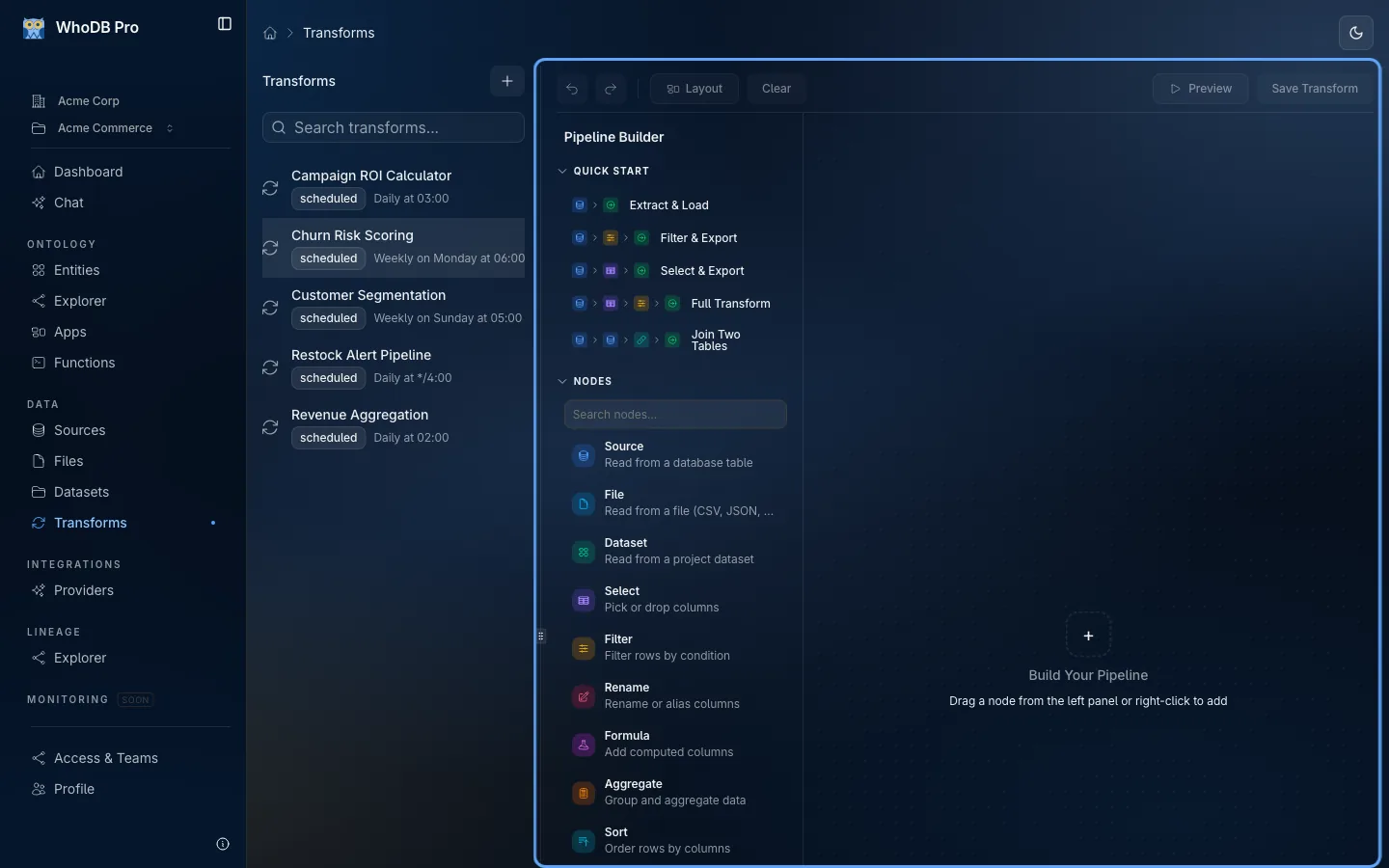
WhoDB is a data platform for lineage, pipelines and AI, built by Clidey. It brings your sources, your queries and your team's context into one visual workspace.
Build it visually
Combine sources, formulas, joins and scripts in one visual workflow. Preview the result before you run it.
Follow every run
See live and past runs, so you know what ran, when, and what came out.
Schedule it
Set recurring work to run on its own.
Ask in plain language
The AI agent can inspect a source or explain a workflow. It follows each person's permissions and can ask for confirmation before an important action.
You can connect supported databases in place, without copying the data first. WhoDB runs fully hosted on WhoDB Cloud, or as a Managed Private deployment inside your own cloud. Read about all features or visit the documentation.
Data Pipelines, Data Quality and Data Lineage
Three ideas often come up together. Data pipelines move the data. Data quality tells you whether it can be trusted. Data lineage shows where it came from and what depends on it.
Used together, they let you build a data pipeline, trust what it delivers, and fix problems fast when something goes wrong.
How to Get Started With Data Pipelines
You do not need a big project. Start small.
0 of 5 done
For another plain explanation, see this guide to data pipelines from AWS.
Data Pipeline Terms in Plain English
| Term | What it means |
|---|---|
| Source | The place data starts, such as a website or a billing system. |
| Destination | The place data ends up, such as a dashboard. |
| Raw data | Data exactly as it was collected, mistakes included. |
| Clean data | Data after mistakes, repeats and odd formats are fixed. |
| Scheduled | Runs at set times, like once a night. |
| Live | Runs all the time, within seconds. |
| Automation | A task that runs without someone doing it by hand. |
| Dashboard | A screen that shows the numbers that matter. |
Data Pipeline FAQ
What are data pipelines in simple terms?
Data pipelines are automated routes that move data from where it is created to where people use it, tidying it up along the way. Think of them as plumbing for information.
Why are data pipelines important?
They save time, reduce mistakes and keep reports fresh. They also give everyone the same numbers, so decisions rest on information people can trust.
How do data pipelines work?
They follow four ideas: collect data from its sources, clean it up, store it in one place, and deliver it to reports and apps. A schedule starts the process and raises a flag if something fails.
What is an example of a data pipeline?
A shop gathers sales from all its tills each night, removes test sales, adds up the totals, and shows them on the owner's dashboard the next morning.
What is the difference between scheduled and live data pipelines?
Scheduled pipelines move data in groups at set times, like a nightly delivery. Live pipelines move data continuously, within seconds, like a conveyor belt. Scheduled is simpler and fits most reports.
Who needs data pipelines?
Any team that relies on numbers from more than one place. Sales, marketing, finance, operations and leadership all benefit from data that arrives automatically.
What is the difference between a data pipeline and ETL?
ETL stands for extract, transform and load. It is one common kind of data pipeline that collects data, changes it, and saves it. A data pipeline is the wider idea of moving data from place to place.
How do I know if my data pipelines are working?
Check the data that arrives, not just whether the job ran. Look at totals, dates and missing information, and compare them with what you expect.
What are the most common data pipeline problems?
The most common problems are jobs that stop quietly, data that arrives late, records counted twice, missing information and changes at the source that the pipeline does not expect.
How do I fix a broken data pipeline?
Find the first step where the data goes wrong, look at what went in and what came out, fix the cause, and run it again from that step. Then add a check so you spot it sooner next time.
How often should data pipelines run?
As often as the decision needs. Daily is enough for most reports. Only use live pipelines when a delay would cost you something, such as missing a fraud attempt.
Do I need a technical team to use data pipelines?
Someone needs to build and look after them, but many people can read the results. You do not need to understand the plumbing to use the reports it feeds.
How are data pipelines connected to data quality?
Pipelines move data, and data quality tells you whether the data that arrived is good enough to use. Without quality checks, a pipeline can deliver bad data very quickly.
How can WhoDB help with data pipelines?
WhoDB lets you build a pipeline as a visual workflow, preview the result before you run it, schedule recurring runs and follow live and past runs. You can connect supported databases in place.
See what your data pipelines really deliver.
Connect your data and take a look in minutes.