
Data exploration tool · by WhoDB
Data Exploration Tool: Ask Your Data Anything With WhoDB
Open your data, ask a question in plain words and get an answer. Here is what a data exploration tool does, and why teams choose WhoDB.
A data exploration tool helps you look inside your data, ask questions and spot patterns before you build a report. WhoDB is a data exploration tool that connects to your data where it lives, lets you ask in plain language and takes you from a first look to workflows, lineage and apps.
Most teams explore data with six tools and a queue. WhoDB puts it in one place. Connect your sources, browse the records, ask a question and see the answer, along with where it came from.
What Is a Data Exploration Tool?
A data exploration tool lets you open your data and look around. You browse tables, see what each column holds, ask questions and spot what looks odd.
It is the step before the report. You are not building a dashboard yet. You are finding out what is really in there.
A data exploration tool helps you understand your data before you rely on it.
Why Exploring Data Is Harder Than It Should Be
Data lives in many places
Orders in one database, customers in another, files in a third.
Every source wants its own tool
So you juggle clients, logins and habits.
Questions wait in a queue
Someone has to write the query, and that someone is busy.
Nobody knows the backstory
A number shows up, and its story is missing.
Six tools and a queue
Open a different tool for each database. Write a query, or ask the data team and wait. Paste results into a spreadsheet. Hope you read the right table.
One place, one question
Connect your sources in WhoDB. Browse the records, or ask in plain language. See the answer, and see where it came from.
Meet WhoDB: A Data Exploration Tool That Does the Heavy Lifting
WhoDB is a data platform for data warehousing, lineage, pipelines and AI, built by Clidey and backed by Y Combinator. It brings your sources, your queries and your team's context into one visual workspace. As a data exploration tool, it takes care of the part nobody enjoys: getting from where is it to here it is.
All your sources, one project
Bring relational, document, key-value, graph, analytical and cloud data together.
Browse like a person
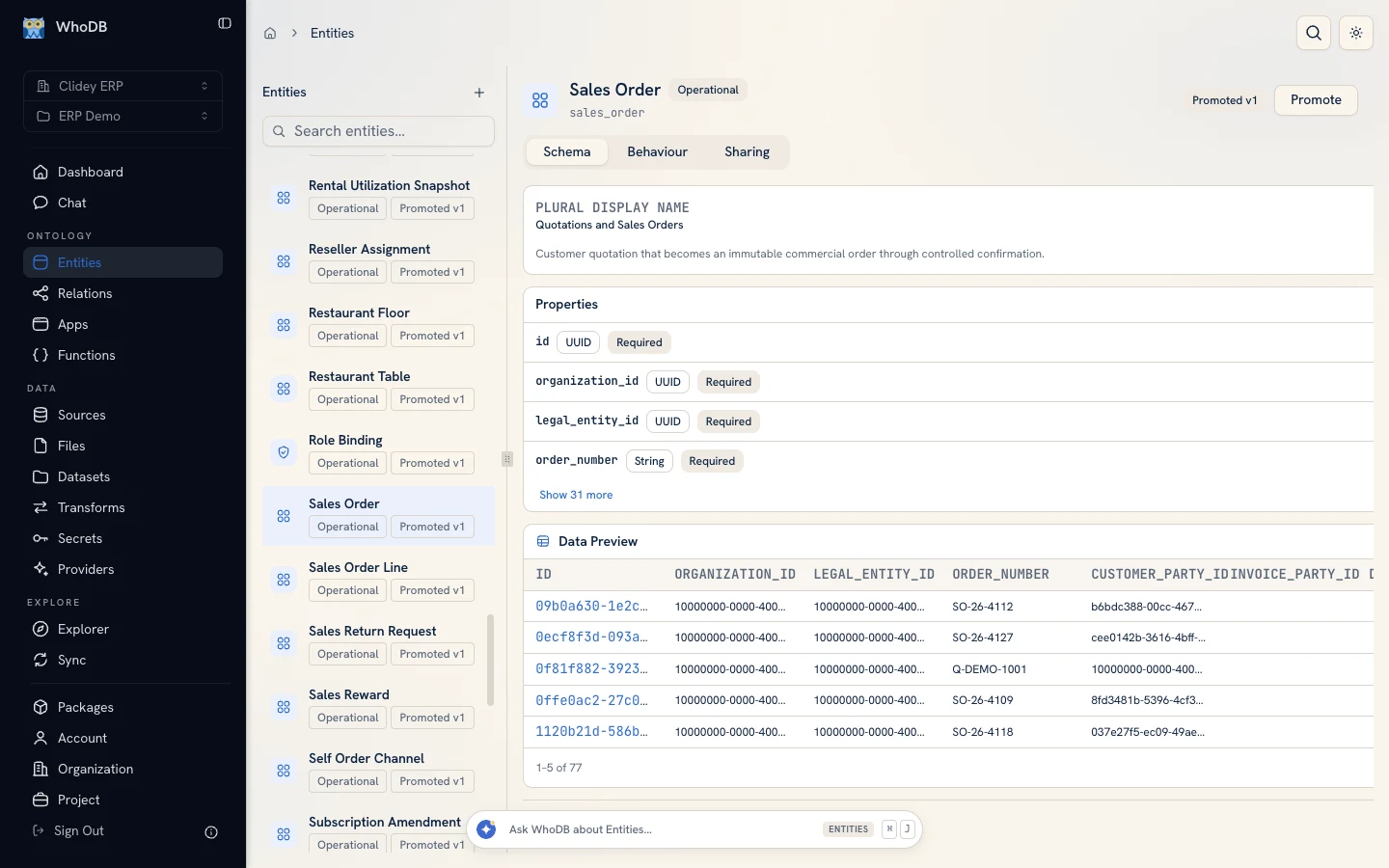
Explore schemas without switching tools, then move from metadata to live records.
Query in each source's own language
When you want control, run native queries.
Just ask
Ask the AI agent to inspect a source or explain a workflow, in plain words.
Safe by design
The agent follows each person's permissions and can ask for confirmation before an important action.
No moving house
Connect supported databases in place. No copying first.
- Connectyour sources
- Looktables and records
- Askin plain words
- Go furtherworkflows and apps
From a first look to a finished tool, in one place.
Three Questions to Ask Your Data Today
Not sure where to start? Try these.
What is in the customers table?
Open any table and see its columns and sample records right away.
Which tables are linked to orders?
Follow a relationship from one table to the next, and see what depends on it.
What does this workflow do?
Ask the agent to explain a workflow in plain language, step by step.
The agent works within each person's permissions, and it checks access before it uses anything.
WhoDB vs Other Ways to Explore Data
There are many ways to explore data. Each has a sweet spot.
| Way | Good for | Where it stops |
|---|---|---|
| Spreadsheets | Quick checks on small data | Slow and error-prone as data grows |
| SQL clients, such as DBeaver | Developers who write queries | Built for people who know SQL |
| Dashboard tools | Sharing charts | Best after the data is understood |
| Notebooks | Analysts who code | Need programming skills |
| WhoDB | Exploring, then acting, in one place, with plain-language help | Works with supported sources, so check the list |
Curious how WhoDB compares with a popular SQL client? Read our WhoDB vs DBeaver guide.
What to Look For in a Data Exploration Tool
Here is a simple checklist, and how WhoDB answers each point.
| What to look for | How WhoDB does it |
|---|---|
| Connects where data lives | Connect supported databases in place, with no copying first |
| Many kinds of databases | Relational, document, key-value, graph, analytical and cloud sources in one project |
| Plain-language questions | An AI agent that inspects sources and explains workflows |
| Respects who can see what | The agent works within each person's permissions |
| Shows context | Lineage shows what feeds a dataset and what depends on it |
| Lets you act on what you find | Turn findings into visual workflows and apps |
How to Explore Data in Five Steps
0 of 5 done
Good checks help here. Our guide to data quality has six simple ones.
Questions People Ask Before They Start
Do I have to move my data?
No. Connect supported databases in place.
Is it safe?
The agent follows each person's permissions and can ask before anything important.
Do I need SQL?
No. Ask in plain language. Native queries are there when you want them.
Where does it run?
On WhoDB Cloud, or as a Managed Private deployment inside your own cloud.
You can connect supported databases in place, without copying the data first. WhoDB runs fully hosted on WhoDB Cloud, or as a Managed Private deployment inside your own cloud. Read about all features or visit the documentation.
Proof from Real Teams
Two teams moved critical work out of fragile spreadsheets and into connected, reviewable workflows. Customer details are anonymized.
Manufacturing: a pricing engine you can test
An industrial fabricator replaced brittle spreadsheet logic with a testable function and connected quote records. 45 reference calculations validate the pricing engine.
Retail: allocation plans in minutes
A retail planning team now prepares an allocation plan in 10–15 minutes, down from 3–4 hours. It starts from recommendations based on its own rules, then reviews and approves the result.
Read the stories: pricing workflow and planning workflow.
Data Exploration and Related Topics
Exploring is the first step. Data quality checks what you find. Data lineage shows where it came from. Database management keeps sources in order, and a Snowflake alternative guide helps if you are rethinking your stack.
Data Exploration Terms in Plain English
| Term | What it means |
|---|---|
| Data exploration | Looking at data to learn what it holds. |
| Source | A place data lives, such as a database. |
| Schema | The layout of a database: its tables and columns. |
| Record | One row of data, such as one customer. |
| Native query | A question written in a database's own language. |
| Read-only access | Permission to look at data without changing it. |
Data Exploration Tool FAQ
What is a data exploration tool?
A data exploration tool helps you look inside your data, ask questions and spot patterns before building a report. It lets you browse records and understand what is there.
What is the best data exploration tool?
The best one connects to your data in place, handles many database types, lets you ask in plain language and respects permissions. WhoDB does all four, and goes on to workflows, lineage and apps.
What is WhoDB?
WhoDB is a data platform for data warehousing, lineage, pipelines and AI, built by Clidey and backed by Y Combinator. It brings your sources, queries and team context into one visual workspace.
How does WhoDB help me explore data?
WhoDB brings many kinds of sources into one project. You can explore schemas, inspect records, run native queries and ask its AI agent questions in plain language.
Do I need to know SQL to explore data in WhoDB?
No. You can ask in plain language. Native queries are available when you want precise control.
Do I have to move my data to use WhoDB?
No. You can connect supported databases in place and explore them without first copying the data into WhoDB.
Which databases does WhoDB connect to?
WhoDB supports major relational databases, warehouses, analytical engines, document stores, key-value systems, graph databases and cloud services, including PostgreSQL, MySQL, MongoDB, Snowflake and BigQuery.
Is the WhoDB AI agent safe to use?
The agent works within each person's project permissions, checks access before it uses a resource and can ask for confirmation before an important action.
What is the difference between data exploration and data analysis?
Exploration is the first look: what is here, what is missing and what is odd. Analysis comes next, when you test ideas and draw conclusions.
What is the difference between a data exploration tool and a BI tool?
A data exploration tool helps you understand data. A business intelligence tool builds charts and dashboards to share results. Many teams explore first, then chart.
Where does WhoDB run?
WhoDB runs fully hosted on WhoDB Cloud, or as a Managed Private deployment inside your own cloud environment.
What can I do after I explore data in WhoDB?
You can build visual workflows, trace lineage, model business concepts and create internal apps, all from the same project.
How do I get started with WhoDB?
Start free, connect a source and ask your first question. If you would like a walkthrough, you can also talk with the WhoDB team.
Your data has answers. Go ask.
Connect your sources and ask your first question in minutes.