
RetailOS Inventory Optimization
Work with stock decisions across locations using a shared inventory model.
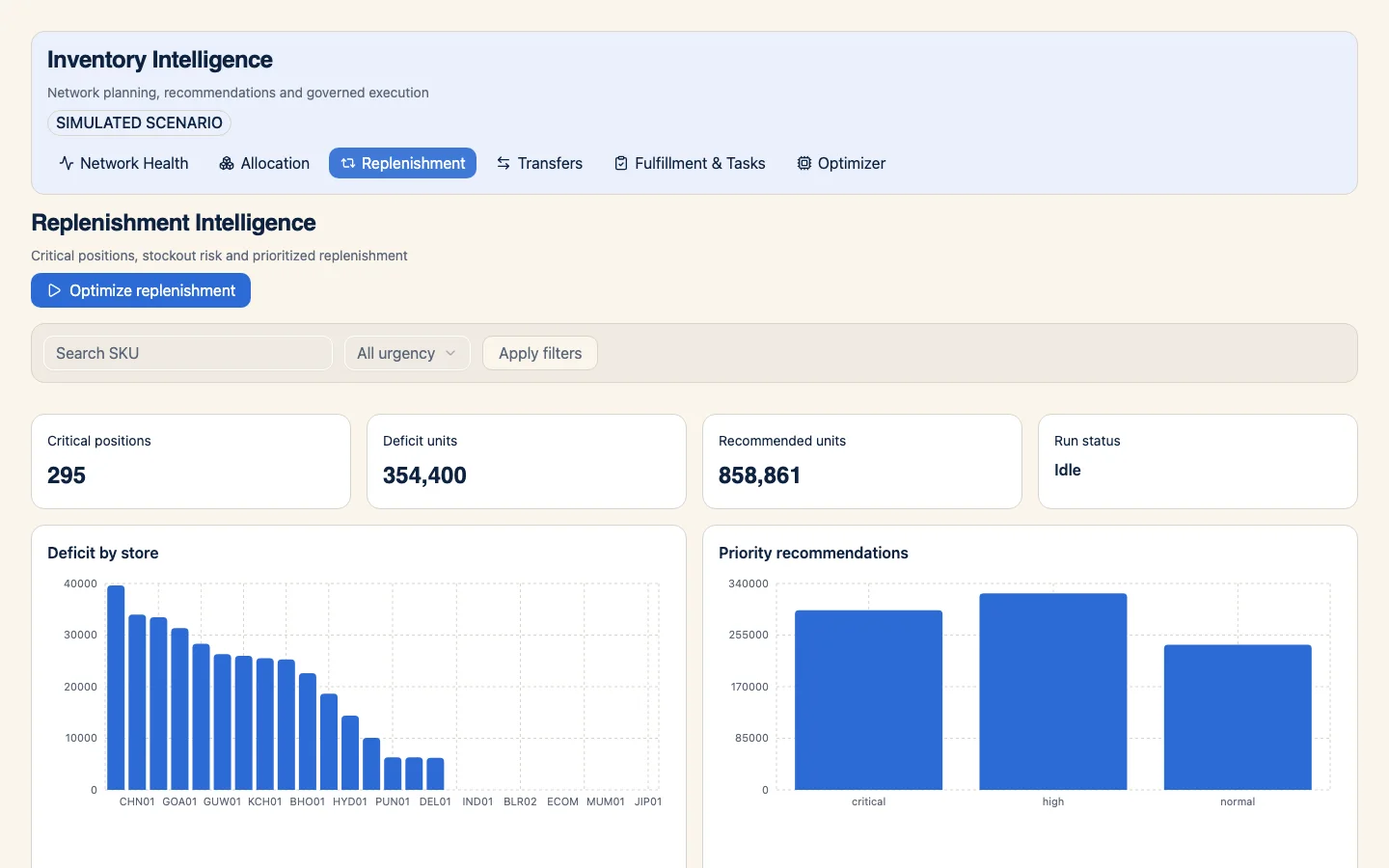
RetailOS source app: replenishment and stock deficits. Captured from the source project's app with sample records; the published package does not include these records.
What this package covers
Network inventory, allocation, replenishment, consolidation, transfers, velocity and exceptions.
This release includes one app and 24 ontology models.
- Network inventory
- Allocation and replenishment
- Consolidation and transfers
- Velocity and exceptions
What you can do with it
A place to examine inventory movement and the exceptions that need attention. The exact included apps, assets, and setup requirements are available in WhoDB before you install.
Get started
- 1. Open the package. Sign in or create a WhoDB account if prompted.
- 2. Pick a target project. You can create a project in your organization if you need one.
- 3. Review the preview. Check included assets, any required bindings, and naming conflicts.
- 4. Install and configure. Open the included app or models, then connect or add data for your workflow.
The current package manifest does not include a dataset. You need to connect or enter data before you can try a complete workflow.
APP PREVIEW STATUS
See what the app actually shows
The screenshot above is from this module's rendered source app, populated by the source project. The installable release does not carry this sample dataset, and its installed app still needs a fresh-project verification.